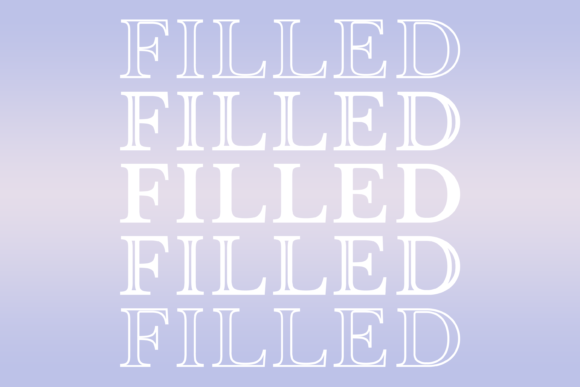
Filled: A Bold and Beautiful Font for Every Creative Project
If you're looking for a font that adds personality, clarity, and visual appeal to your designs, Filled is an excellent choice. This unique typeface combines modern aesthetics with a strong, readable structure, making it ideal for a wide range of applications—from branding and web design to social media posts and print materials. Whether you're a beginner or a seasoned designer, Filled offers a versatile and stylish option that can elevate your work.
But like any tool, Filled isn't without its nuances. Understanding how to use it effectively can make a big difference in the final outcome of your projects. Let's explore what Filled is, why it's popular, and how to avoid common pitfalls when working with it.
What Is Filled and Why It Stands Out
Filled is a sans-serif font known for its clean lines, balanced proportions, and bold presence. Unlike many other fonts that may feel generic or overly complex, Filled strikes a perfect balance between simplicity and sophistication. Its uniform stroke width and consistent letterforms make it highly legible, even at smaller sizes. This makes it particularly useful for headings, logos, and titles where clarity is essential.
One of the key reasons designers choose Filled is its versatility. It works well in both digital and print formats, and its modern look fits seamlessly into contemporary design trends. Whether you're creating a website, a poster, or a business card, Filled can add a touch of professionalism and style without overwhelming the viewer.
Common Mistakes When Using Filled
Despite its strengths, Filled isn't a one-size-fits-all solution. Many users make mistakes when selecting or applying this font, which can lead to suboptimal results. Here are some of the most common issues and how to avoid them.
Mistake 1: Overusing the Font
While Filled is visually striking, using it excessively can make your design feel cluttered or unbalanced. Some users apply it to entire paragraphs or large blocks of text, which can reduce readability and create a chaotic visual effect.
Fix: Use Filled primarily for headlines, titles, or short phrases. Pair it with a more neutral font for body text to maintain contrast and readability. For example, combine Filled with a serif font like Georgia or a sans-serif like Open Sans for a clean, professional look.
Mistake 2: Ignoring Licensing Terms
Many people download fonts without fully understanding the licensing agreements. Filled, like most commercial fonts, comes with specific usage rights. Using it in a project without proper permission can lead to legal issues, especially if you're designing for clients or publishing online.
Fix: Always check the license before downloading or using Filled. If you're using it for commercial purposes, ensure you have the correct license type. Many font foundries offer different licenses for personal, commercial, or web use—make sure you're compliant.
Mistake 3: Not Testing in Different Contexts
Filled may look great on a screen, but its appearance can change depending on the medium. Print quality, resolution, and color settings can all affect how the font looks. Some users overlook these factors and end up with a final product that doesn’t meet their expectations.
Fix: Test Filled in multiple environments. Preview it on different devices, print samples, and review it in various color schemes. This will help you identify any issues before finalizing your design.
How to Choose the Right Version of Filled
Before committing to Filled, take the time to evaluate the available versions. Some fonts come in different weights, styles, or language support options. Choosing the wrong variant can limit your creative flexibility or cause compatibility issues.
Checklist Before Using Filled:
- Language Support: Ensure the version you choose includes the characters needed for your target audience.
- Weight and Style: Select the appropriate weight (light, regular, bold) based on your design needs.
- Platform Compatibility: Confirm that Filled works across your intended platforms, including web, mobile, and print.
- Font Format: Choose the correct format (TTF, OTF, WOFF) based on your project requirements.
By taking these steps, you can avoid unnecessary delays and ensure that Filled enhances your work rather than complicates it.
Realistic Examples of Filled in Action
Let’s look at a few practical examples of how Filled can be used effectively:
- Logo Design: A tech startup might use Filled for its logo to convey innovation and clarity. The font’s boldness helps the brand stand out while maintaining a professional tone.
- Web Headlines: A blog could use Filled for article titles to draw attention and improve readability. Pairing it with a simpler font for the body text creates a balanced layout.
- Print Materials: A small business might use Filled on a brochure or flyer to highlight key information, such as contact details or special offers.
In each case, Filled adds a polished and modern feel without overshadowing the content.
Final Thoughts on Using Filled
Filled is a powerful and versatile font that can enhance a wide range of creative projects. However, like any design element, it requires thoughtful application. By avoiding common mistakes, understanding licensing, and testing thoroughly, you can ensure that Filled contributes positively to your work.
Whether you're a designer, marketer, or hobbyist, Filled offers a reliable and stylish option that can bring your ideas to life. With the right approach, it can become a go-to font for your next project.